The OWASP Mobile Top 10: Key Risks and How to Mitigate Them
Explore the OWASP Mobile Top 10 risks, their impact on startups, and practical steps GRSee Consulting uses to secure mobile apps and data effectively.




Updated February 27, 2026
AI Summary


The OWASP Mobile Top 10 highlights the most critical security risks affecting mobile applications today. With mobile-first business models on the rise, startups and SMBs face increasingly complex threats. Ignoring these vulnerabilities can lead to data breaches, regulatory fines, and reputational damage. Effective mobile security requires both automated detection and expert-led analysis to uncover hidden risks.
In this blog, we will explore each risk, practical steps for mitigation, and how GRSee Consulting can help you protect your mobile applications.
» Don’t let OWASP mobile vulnerabilities compromise your systems—Contact us to secure your systems
The Mobile-First Threat Landscape and Boardroom Security
The shift to mobile-first business models has rapidly changed the threat landscape for startups and SMBs. The focus has shifted from protecting traditional network perimeters to defending numerous distributed endpoints—the mobile devices and applications used daily by both customers and employees.
This strategic change means attackers now prioritize targeting these off-premise mobile endpoints, increasing exposure to threats like sophisticated malware, phishing, and "Man-in-the-Middle" attacks on unsecured Wi-Fi. The result is a sharp rise in incidents.
Since mobile devices are the primary gateway to sensitive corporate data, cloud services, and internal systems, a security failure compromises more than technology; it strikes at business continuity, severely damages brand trust, and exposes the company to massive regulatory fines.
» Heard of OWASP ZAP? Here's how to integrate ZAP with other security tools
New Technological Shifts and Expanded Attack Surface
Recent technological shifts have dramatically expanded the mobile security attack surface, introducing new challenges:
- Cloud-native architectures: Apps relying on cloud microservices expose numerous APIs, which have become a primary target. One survey indicates that a significant percentage of mobile app vulnerabilities are API-related, as misconfigurations and poor authorization expose backend data.
- Third-party SDKs: The reliance on third-party Software Development Kits (SDKs) is pervasive—over 90% of mobile apps integrate at least one SDK. This introduces supply chain risk, with a large fraction of app vulnerabilities traced to outdated or poorly maintained libraries.
- AI-Driven features: The incorporation of AI capabilities raises new vectors for data leakage and adversarial attacks. Recent research by ScienceDirect found that apps using AI features were sending data to remote AI endpoints, creating potential exposure points.
These factors mean that even a robustly coded core application can be compromised by a weak API, an insecure third-party component, or a misconfigured cloud backend, necessitating constant vigilance beyond the app's initial development.
» Read more on how to master cloud security
Mobile vs. Web Applications: Security Architecture and Risk
Mobile applications differ from web applications in security architecture, exposure, and risk-management priorities, as highlighted by resources like The OWASP Mobile Top 10.
Feature | Mobile Applications | Web Applications |
|---|---|---|
Execution & Architecture | Runs on the user's device (client-side), outside of enterprise control. | Largely runs on servers (server-side), controlled by the organization. |
Code Exposure | Binaries are easily downloaded from app stores and can be reverse-engineered by attackers to tamper with logic or extract secrets. | Code remains on the server (backend logic is hidden), reducing the risk of client-side tampering. |
Primary Attack Vectors | Device permissions, insecure local storage, vulnerable third-party SDKs, jailbroken/rooted devices. | Classic web threats: Cross-Site Scripting (XSS), SQL Injection, Cross-Site Request Forgery (CSRF). |
Risk-Management Priority | Device Security (data-at-rest encryption, code obfuscation), Third-Party SDK Governance, Secure Update Processes (user choice delays patching). | Server-Side Security (rapid patching, input validation, server configuration), Network Firewalls. |
Exposure | Installed on devices that connect to insecure networks (e.g., public Wi-Fi) and may store sensitive data locally. | Exposed via web browser; less access to native device features or local persistent storage. |
» See how hackers exploit security vulnerabilities: Learn about the benefits of penetration testing
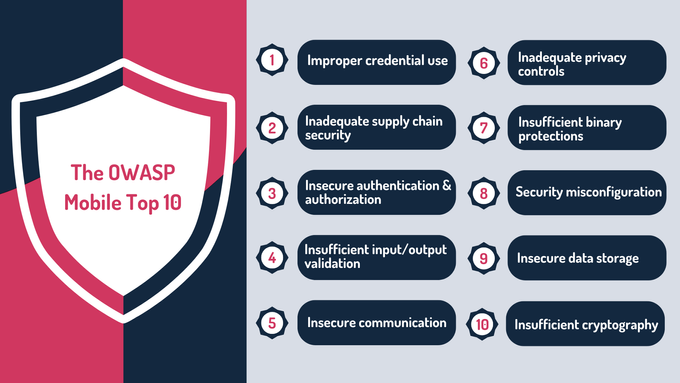
The OWASP Mobile Top 10
1. Improper Credential Use
Apps often store credentials or API keys insecurely, reuse the same credentials across multiple services, or expose tokens unnecessarily. On Android, credentials may be left in SharedPreferences or open files, while on iOS, they can be mismanaged in Keychain or NSUserDefaults.
Attackers exploit these weaknesses to hijack accounts, access sensitive APIs, or escalate privileges.
Impact on SMBs: High. Exposed credentials can lead to account takeovers, fraudulent transactions, regulatory fines, and reputational damage—risks that small startups often cannot absorb.
Common mistakes & solutions:
- Mistakes: Hard-coded secrets, insecure storage, long-lived static tokens, and mismanaged API keys.
- Solutions: Use secure platform storage (Keychain/Keystore), enforce token rotation, conduct code reviews, run automated SAST scans, and integrate secret management into CI/CD pipelines.
Practical steps for startups:
- Use managed secret stores like AWS Secrets Manager or HashiCorp Vault and inject secrets at runtime.
- Always use secure platform storage (iOS Keychain, Android Keystore) instead of reversible local storage.
- Implement short-lived tokens with OAuth2 refresh flows.
- Run automated scans for hard-coded secrets (TruffleHog, GitLeaks).
- Integrate CI/CD checks to catch secrets in code and dependencies early
» Check out these cybertips for your startup plan
2. Inadequate Supply Chain Security
When apps rely on third-party SDKs, libraries, or CI/CD pipelines, vulnerabilities can be inherited if components are outdated, malicious, or poorly configured. Compromised dependencies may exfiltrate data, introduce malware, or provide attackers with backend access.
Impact on SMBs: High. A single compromised SDK can affect all users, necessitate rebuilds and notifications, and create regulatory exposure. Startups often lack vendor governance, making them especially vulnerable.
Common mistakes & solutions:
- Mistakes: Using unvetted SDKs, granting excessive permissions automatically, storing CI secrets in plaintext, and no SBOM (software bill of materials).
- Solutions: Maintain SBOMs, approve SDKs through security checklists, implement automated dependency scans (SCA tools), store CI/CD secrets in vaults, and encapsulate critical SDKs via internal APIs.
Practical steps for startups:
- Enable dependency scanning tools.
- Pin dependency versions and grant only the minimum permissions needed.
- Keep code-signing keys in a secure vault, not on local drives.
- Regularly scan release artifacts and monitor vendor security advisories.
- If a critical SDK is used, isolate it behind an internal API to limit exposure.
» Learn more: Is your supply chain putting your company at significant risk?
3. Insecure Authentication & Authorization
Weak authentication and authorization happen when apps rely on client-side checks, fail to validate tokens server-side, or allow session hijacking. Root/jailbreak bypasses and storing role flags locally are common attack vectors. These flaws often target backend APIs rather than the app itself.
Impact on SMBs: Very high. Risks include account takeover, fraudulent transactions, unauthorized access to admin functions, and regulatory penalties.
Common mistakes & solutions:
- Mistakes: Client-side role enforcement, missing multi-factor authentication, and no session invalidation.
- Solutions: Server-side RBAC, short-lived tokens with refresh cycles, MFA for sensitive actions, automated auth tests in CI, and API anomaly detection.
Practical steps for startups:
- Use standard authentication providers (Auth0, AWS Cognito) to avoid custom mistakes.
- Rotate short-lived tokens and refresh them regularly.
- Always check authorization server-side, not just on the client.
- Run lightweight automated API tests to detect auth gaps.
- Use API gateways for rate limiting and geofencing to prevent misuse.
» Find out how to secure API authentication and authorization in SaaS apps
4. Insufficient Input/Output Validation
This occurs when apps fail to validate inputs from users or external sources such as intents, deep links, clipboard data, or remote content. It can lead to injection attacks, command execution, or logic errors.
Both Android Intents and iOS URL schemes are frequent entry points, and unvalidated server responses can compound the risk.
Impact on SMBs: Moderate to high. Exploits can cause data loss, credential theft, or remote code execution, particularly in apps handling financial or personal data.
Common mistakes & solutions:
- Mistakes: Trusting client-side input, using weak parsing libraries, and a lack of server-side validation.
- Solutions: Validate and sanitize inputs on both client and server, use strong parsing libraries, integrate fuzzing in CI, and enforce schema validation for API contracts.
Practical steps for startups:
- Validate and sanitize all inputs, including deep links, push payloads, and clipboard data.
- Use prepared statements, ORMs, and schema validation for APIs.
- Include lightweight fuzzing in CI pipelines (OWASP ZAP, JSON fuzzers).
- Reject unexpected fields or malformed inputs early.
- Test input validation in unit and integration tests consistently.
» Discover how UUIDs can minimize risk and enhance data security
5. Insecure Communication
Insecure communication arises when apps use unencrypted channels, weak TLS versions, or fail to validate certificates. Misconfigured network stacks, insecure webviews, and a lack of certificate pinning allow attackers to intercept sensitive data.
Impact on SMBs: High. Intercepted credentials, tokens, or PII can lead to regulatory violations, fraud, and loss of user trust.
Common mistakes & solutions:
- Mistakes: Using cleartext traffic, disabling certificate validation in development, no certificate pinning.
- Solutions: Enforce TLS 1.2+ and modern cipher suites, strict certificate validation, TLS pinning for sensitive endpoints, and mirror production TLS settings in testing.
Practical steps for startups:
- Adopt platform network security config (Android Network Security Config, iOS ATS).
- Disallow cleartext, use HSTS on servers, and add TLS monitoring.
- For lightweight pinning, use pinning libraries cautiously or rely on short cert lifetimes & automated rotation.
- Use automated scans (API scanners) to verify endpoints require TLS.
» Here's everything you need to know about data network security

Protect Your Apps with GRSee
We help startups strengthen mobile security with clear, practical steps that reduce real-world risk.
6. Inadequate Privacy Controls
Apps may collect excessive personal data, share it with analytics or AI services without consent, or fail to minimize retention. Overuse of runtime permissions or lack of user controls (e.g., for consent or deletion) contributes to privacy risks.
Impact on SMBs: High. Violations can result in GDPR/CCPA fines, class actions, and loss of customer trust, which is particularly damaging for startups.
Common mistakes & solutions:
- Mistakes: Unnecessary PII collection, unauthorized data sharing, and poor retention policies.
- Solutions: Apply privacy-by-design principles, pseudonymize/anonymize data, maintain auditable consent, and map data flows for review.
» Learn more about AI's role in the future of cybersecurity
Practical steps for startups:
- Implement consent frameworks and least-privilege permissions.
- Use privacy-preserving analytics.
- Maintain a personal data inventory.
- Use OWASP Mobile Privacy Checklists.
» Learn more: What is compliance and why do you need it?
7. Insufficient Binary Protections
Weak binary protections let attackers reverse-engineer APK/IPA files, revealing app logic, keys, or enabling malicious repackaging. Lack of obfuscation, tamper detection, or runtime integrity checks increases the attack surface.
Impact on SMBs: High. IP theft, app cloning, revenue loss, and brand damage are possible, especially for small companies.
Common mistakes & solutions:
- Mistakes: Skipping obfuscation, including debug symbols, and ignoring runtime integrity checks.
- Solutions: Apply obfuscation, strip debug symbols, enable tamper detection, and include runtime integrity validation in release pipelines.
Practical steps for startups:
- Use ProGuard/R8, Bitcode, or lightweight obfuscators.
- Monitor app stores for repackaged versions.
- Maintain a release checklist for binary hardening.
8. Security Misconfiguration
This happens when apps are released with insecure defaults, such as exposed debug endpoints, overly permissive CORS, open storage, or leftover test accounts. Misconfigured network and backend settings further increase the risk of vulnerabilities.
Impact on SMBs: High. Low-effort attacks can lead to data leaks or admin takeovers, with disruptive and costly remediation.
Common mistakes & solutions:
- Mistakes: Shipping debug builds, leaving open services, poor dev/prod environment separation.
- Solutions: Segregate environments, automate configuration checks in CI, enforce secure defaults, and audit configs regularly.
Practical steps for startups:
- Disallow debug builds via CI gating.
- Conduct quarterly configuration reviews.
- Prefer managed services with secure defaults.
» Did you know? The cloud might not be safe anymore
9. Insecure Data Storage
Sensitive data is stored unencrypted on devices, in files, SharedPreferences, NSUserDefaults, caches, or external storage. Rooted or jailbroken devices allow easy extraction, and backups can also expose data.
Impact on SMBs: High. Exposure of PII or tokens can lead to account takeover, regulatory penalties, and immediate loss of customer trust.
Common mistakes & solutions:
- Mistakes: Storing tokens in cleartext, lack of encryption, over-trusting device security.
- Solutions: Encrypt local storage, restrict app-private directories, disable backups, review storage in code audits, and minimize sensitive data retention.
Practical steps for startups:
- Use secure storage libraries (SQLCipher, keystore wrappers).
- Static and runtime scans for unexpected files.
- Encrypt local databases and audit logs/caches before release.
- Limit local storage of sensitive data.
» Understand how asymmetric and symmetric encryption protect sensitive data
10. Insufficient Cryptography
The use of poor algorithms, custom crypto, hard-coded keys, or incorrect crypto modes, such as ECB, can be sources of weak crypto. Apps may create their own crypto or misuse the platform's primitives.
In both cases, it results in the encryption of PII that can be reversed or storing the keys in code/binaries. TLS or cryptographic libraries misuse also falls under this category.
Impact on SMBs: High. Weak crypto undermines all other security measures, potentially allowing data decryption, token forgery, and regulatory/financial penalties.
Common mistakes & solutions:
- Mistakes: Unsupported cipher suites, hard-coded keys, custom crypto implementations.
- Solutions: Use vetted libraries, AES-GCM/RSA/ECDSA, managed KMS, automated crypto misuse scans, and code reviews by experienced engineers.
Practical steps for startups:
- Store keys in managed KMS (AWS KMS, Azure Key Vault) instead of in code.
- The employment of standard algorithms (e.g., AES-GCM, RSA/ECDSA for asymmetric where necessary) and the use of community-maintained libraries are advisable.
- Implementation of automated dependency & crypto misuse scanning along with simple unit tests that check encryption/decryption expectations is encouraged.
» Keep your mobile devices secure. Here's everything you need to know about the evolution of cybersecurity

Strengthen Your Mobile App Security
Secure your iOS and Android apps by uncovering critical flaws before attackers get the chance.
Hybrid testing to find issues scanners miss.
Full coverage across the app, backend, and APIs.
Actionable fixes to strengthen your security posture.
How GRSee Consulting Can Help
At GRSee Consulting, we combine advanced automated scans with expert-led manual penetration testing to give startups and SMBs comprehensive coverage of the OWASP Mobile Top 10 risks. Our team uses contextual analysis, threat modeling, and tailored exploit attempts to uncover vulnerabilities automated tools may miss.
Beyond detection, we provide personalized remediation guidance, integrate security into your SDLC, and train developers to adopt proactive practices. This hybrid approach ensures your mobile apps stay secure, protecting both your data and reputation.
» Take control of your security—contact GRSee today
FAQs
What is the OWASP Mobile Top 10?
The OWASP Mobile Top 10 is a list of the most critical security risks for mobile applications. It guides developers and security teams to prioritize defenses and understand where mobile apps are most vulnerable.
Why is mobile security a board-level concern for startups and SMBs?
Mobile security can directly affect customer trust, regulatory compliance, and revenue. A single breach can expose user data, result in fines, and damage a startup’s reputation, making it a strategic concern beyond just technical teams.
How can automated tools help identify mobile security risks?
Automated scanning tools can quickly detect common vulnerabilities such as insecure storage, weak crypto, or misconfigured endpoints. While efficient, they should be paired with manual testing to uncover complex issues that automated tools might miss.
What are the most common mistakes developers make that lead to mobile vulnerabilities?
Typical errors include storing credentials insecurely, using weak encryption, neglecting input validation, misconfiguring APIs, and over-permissioning third-party SDKs. Many of these can be prevented through secure coding practices and early SDLC checks.
How does a hybrid testing approach enhance risk coverage?
Hybrid testing combines automated vulnerability scans with manual exploitation techniques, threat modeling, and contextual analysis. This approach identifies complex logic flaws, chained vulnerabilities, and high-impact attack paths that are typically invisible to standalone tools.
How does GRSee Consulting support mobile security for startups and SMBs?
GRSee Consulting provides a hybrid approach combining automated scanning and manual penetration testing, along with threat modeling, remediation guidance, SDLC integration, and developer training. This ensures comprehensive coverage and reduces OWASP Mobile Top 10 risks effectively.